
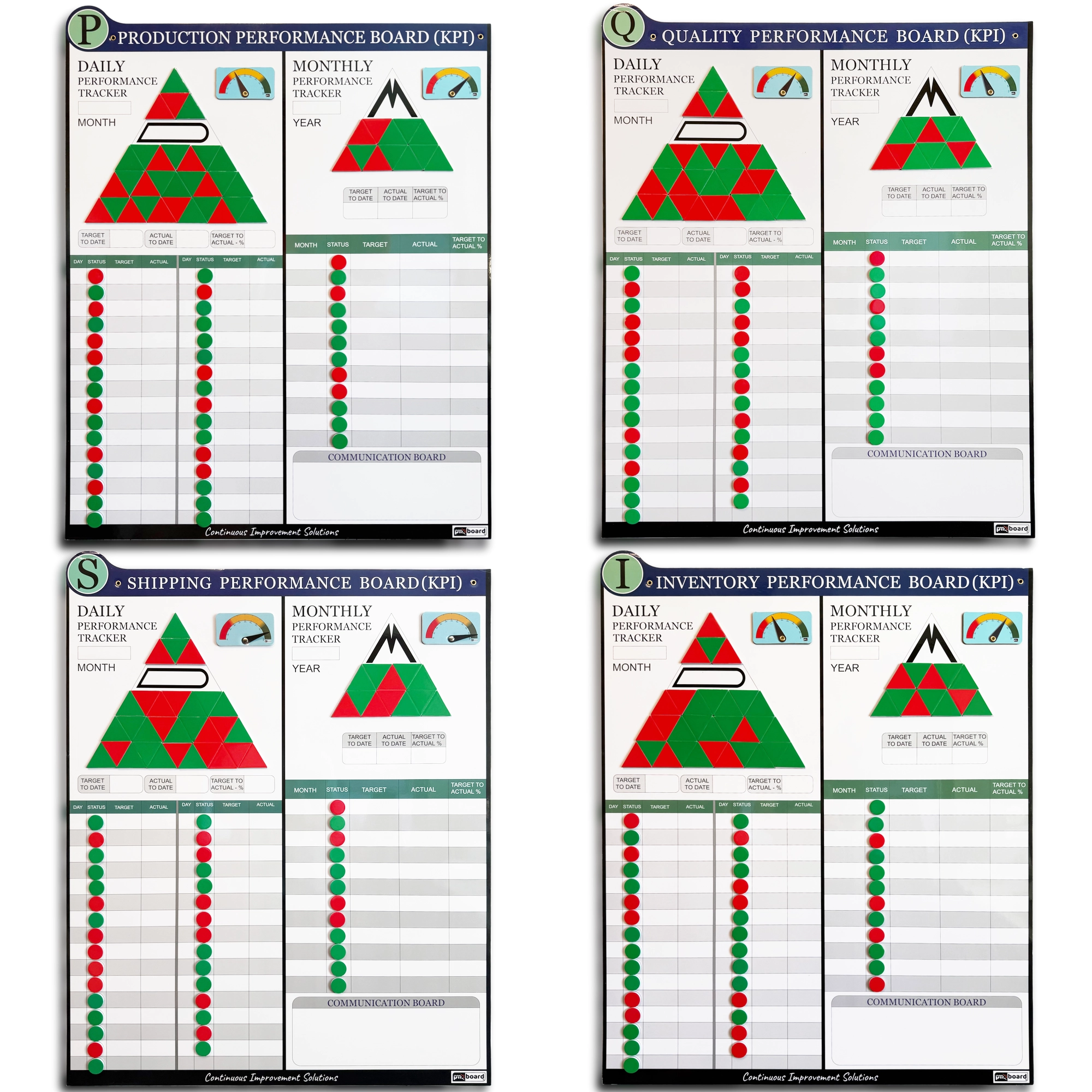
Picking between KPI boards for manufacturing usually comes down to three questions: which department owns the numbers, how often the team needs to look at them, and how many areas you want covered. This guide walks through each one so a plant manager, CI or lean lead, or area supervisor can match the right magnetic board to the right team without buying more than the floor will actually use.
Start with who owns the number
If you are still deciding whether your team needs a KPI board at all, or how to lay one out from scratch, start with our guide to tracking what actually matters on a KPI board. This article assumes you have already made that call and now need to choose hardware.
The most useful buying rule is simple: buy the board for the department that owns the result. A production supervisor can move output and downtime. A quality lead can move defects and rework. A shipping lead can move backlog. A stockroom or materials lead can move stockouts. Buy by owner first, and the rest of the decision gets much easier.
Choosing KPI display boards by department
PMXBOARD makes four department boards. They share the same 33 x 26 inch magnetic dry erase format and the same kit, so the real difference is what each one is set up to track.
Production: output against plan, downtime, scrap and OEE
Who it fits: line and cell supervisors, production managers, and anyone who runs a shift start or shift handoff around output.
What you track: the Production KPI board is built around units produced vs. plan, downtime, scrap rate, OEE and safety incidents. If your first question every morning is “did we make the number yesterday, and if not, why?”, this is the board.
Quality: defects, first pass yield and rework
Who it fits: quality engineers, inspection leads and supervisors who own scrap and rework conversations.
What you track: the quality board for defects and first pass yield covers defects, First Pass Yield, rework, scrap, audit score and customer returns. Its notes area gives the team a place to keep corrective actions in view next to the numbers.
Production KPI board vs quality KPI board: where to draw the line
Both boards can hold scrap, which is where buyers get stuck. A practical split: if the people at the board are the ones running the equipment and the conversation is about volume and time lost, scrap belongs on the production board. If the conversation is about why parts failed, what customers sent back, and what an audit found, it belongs on the quality board. Many plants with a dedicated quality function end up running both, side by side, at the same area.
Shipping: on-time shipments, backlog and carrier delays
Who it fits: shipping, dock, fulfillment and logistics leads.
What you track: a KPI board for shipping needs to answer “what went out on time, and what is stuck?” The shipping performance board is set up for on-time shipment rate, backlog, pick and pack accuracy, carrier delays and damage claims, and fits naturally into a dispatch review.
Inventory: stock levels, stockouts and cycle counts
Who it fits: inventory control, materials, stockroom and warehouse teams.
What you track: a KPI board for inventory should make shortages obvious before they stop a line. The inventory and stock tracking board covers on-hand inventory, min/max levels, stockouts, inventory turns, cycle count accuracy and work in process, with room to note replenishment actions.
Quick comparison
| Option | Best for | Built to track | Layout |
|---|---|---|---|
| Production board | Line and shift supervisors | Units vs. plan, downtime, scrap rate, OEE, safety incidents | Daily + monthly, 33 x 26 in |
| Quality board | Quality and inspection leads | Defects, FPY, rework, scrap, audit score, customer returns | Daily + monthly, 33 x 26 in |
| Shipping board | Shipping, dock and fulfillment | On-time shipment rate, backlog, pick and pack accuracy, carrier delays, damage claims | Daily + monthly, 33 x 26 in |
| Inventory board | Inventory control and materials | On-hand, min/max, stockouts, turns, cycle count accuracy, WIP | Daily + monthly, 33 x 26 in |
| 4-board set | Plant-wide or multi-department rollout | All four of the above | Daily + monthly on each board |
Daily vs monthly KPI tracking: which layout do you need?
This is the question buyers ask most, and the answer is shorter than you might expect: you do not have to choose. Every PMXBOARD department board carries a Daily Performance Tracker and a Monthly Performance Tracker on the same surface. So the real buying question is how much each section will be used, and whether one board can cover your cadence.
When the daily section does the heavy lifting
The daily side is for target, actual and a red or green call for each day. Output, downtime, backlog and stockouts move shift to shift, so production, shipping and inventory teams will live on this half. Each single-board kit includes 64 daily triangle magnets (32 green, 32 red) for exactly that job.
When the monthly section matters more
The monthly side keeps a year-to-date overview in view. Metrics such as inventory turns, audit score and customer returns are often reviewed on a monthly rhythm, so a quality or materials manager may lean on this half more. Each kit includes 26 monthly triangle magnets (13 green, 13 red) for the monthly and yearly view.
Why having both on one board helps
A single daily-and-monthly KPI tracking board means the bad Tuesday and the three-month trend sit in the same line of sight. The team can tell at a glance whether a red day is a blip or part of a pattern. If you want help deciding what counts as red or green, and how to run the daily review itself, see how to use visual KPIs for daily leadership.
One board or the complete 4-board set?
Every single-board kit arrives ready to hang: the board, 64 daily and 26 monthly triangle magnets, 90 round status magnets (45 green, 45 red), two 0 to 100% performance status indicators, a blank magnetic customization strip, four dry erase markers (two black, one blue, one red), an eraser and wall-mount hardware.
Buy one board if one department owns the problem you are trying to fix, you are piloting visual KPIs in a single area before rolling out, or you already have boards elsewhere and are filling a gap. Start where the pain is: missed output points to production, escapes and returns point to quality, late orders point to shipping, shortages point to inventory.
Buy the set if you are standing up visual management across the plant, or production, quality, shipping and inventory already meet together and need a shared picture. The complete 4-board KPI set includes all four 33 x 26 inch boards with 256 daily triangle magnets, 104 monthly triangle magnets, 360 status magnets, eight performance status indicators, four customization strips, 16 markers, four erasers and wall-mount hardware. If that rollout is part of a wider visual factory effort, matching boards across areas makes a Gemba walk easier to read.
Need more gauges? Two indicators per board covers most teams. If you want to show progress on more KPIs or more zones, the 8-pack of magnetic performance status indicators adds adjustable 0 to 100% gauges that snap onto the same boards.
Frequently asked questions
Can I use one of these boards for safety, maintenance or another KPI?
Yes. Each board includes a blank magnetic customization strip that covers the printed title so you can write a new header. The product pages list examples such as safety, maintenance, delivery, cost, dispatch and materials control.
What size are the boards?
Each department board is 33 x 26 inches, and the 4-board set contains four boards of that same size.
Do I need to buy magnets or markers separately?
No. Every board ships as a complete kit with triangle magnets, round status magnets, two performance indicators, markers, an eraser and wall-mount hardware. The indicator 8-pack is only for teams that want extra gauges.
Are the four department boards different layouts?
They share the same daily-plus-monthly structure and the same kit contents. What changes is the department focus and the metrics each board is set up for, which is why it makes sense to choose by owner. If you want to see how a KPI board sits alongside huddle, problem-solving and tier boards, browse these visual management board examples.
Pick your board
Match the board to the person who owns the number, use the daily side for what moves every shift and the monthly side for the trend, and move to the full set once more than one department is meeting around the same results. Compare all of our KPI boards for manufacturing on the PMXBOARD KPI performance boards page.