A visual management board turns “what’s happening?” into something your team can answer in seconds—without hunting through emails, spreadsheets, or dashboards.
When designed well, it becomes the heartbeat of daily execution: priorities stay visible, problems surface early, and improvement becomes routine.
In this guide, you’ll see practical visual management board examples and simple templates you can copy—whether you’re leading a production team, managing projects, or running daily operations. Each example also points to a ready-made magnetic board, if you’d rather not draw the layout by hand.
Short on time? Jump to Which board fits which use, or browse the KPI performance boards and Kaizen board sets.
What Is a Visual Management Board?
A visual management board is a shared, visible workspace that communicates the current reality of work—status, priorities, performance, and problems—at a glance.
It typically includes:
- What matters today: priorities and key commitments
- How we’re performing: a small set of KPIs
- What’s stuck: blockers, issues, risks, or defects
- What we’re improving: actions, experiments, and follow-ups
Why Visual Boards Work
- Clarity: the team shares one source of truth
- Faster decisions: problems become obvious sooner
- Accountability: owners and due dates are visible
- Consistency: daily routines stick when the board is always there
- Continuous improvement: issues don’t disappear—they get tracked
Quick Design Rules for Any Visual Management Board
Before the templates, a few rules that prevent boards from becoming wall art:
- Keep it small: only what the team reviews regularly
- Make ownership explicit: every open item has one owner
- Use signals: red/green, blocker flags, aging markers
- Review on a cadence: daily/weekly reviews are the “engine”
- Prefer physical visibility: if it’s not seen, it won’t be used
Example 1: Daily Team Huddle Board Template
Best for: operations teams, support teams, project teams, supervisors
Template Layout
- Today’s Priorities (Top 3)
- Plan vs Actual (lightweight check)
- Blockers / Escalations (with owner + next step)
- Actions / Follow-ups (with due date)
How to Use It
- Start each huddle by confirming the Top 3 priorities.
- Review blockers next (not last) to remove friction early.
- Never problem-solve in the huddle—assign an owner and schedule a follow-up.
More on running the meeting itself: How to Run a Daily Huddle That Actually Works. To keep actions visible between huddles, a magnetic Kaizen Actions Board gives every follow-up an owner and a place on the wall.
Example 2: KPI Performance Board Template
Best for: production floors, warehouses, service teams, leadership reviews
Template Layout
- Safety (incidents, near misses, audits)
- Quality (defects, rework, first-pass yield)
- Delivery (on-time %, lead time, backlog)
- Cost / Productivity (output, efficiency, overtime)
- People (training, attendance, staffing)
Rules
- Use 2–5 KPIs max per team board (more = nobody looks).
- Show a simple trend (this week vs last week).
- Every red metric gets a next action.
Ready-made options: PMXBOARD makes department-specific magnetic KPI boards, so each team tracks its own numbers instead of sharing one crowded chart:
- Production KPI Board for daily and monthly output tracking
- Quality KPI Board Set for defects and first-pass yield
- Shipping KPI Board for delivery performance
- Inventory KPI Board for stock tracking
- Complete KPI Board Set with all four boards for a full performance wall
Choosing what to measure first? Read KPI Boards: How to Track What Actually Matters and How to Use Visual KPIs for Daily Leadership.
Example 3: Problem-Solving Board Template (Quick PDCA)
Best for: teams building a habit of daily improvement
Template Layout
- Problem Statement (what, where, when, impact)
- Current Condition (facts, data, examples)
- Hypothesis / Root Cause (best current thinking)
- Countermeasure (what we will try)
- Owner + Due Date
- Check Result (what changed?)
This template keeps improvement lightweight while still disciplined—perfect when you’re not ready for full A3 depth.
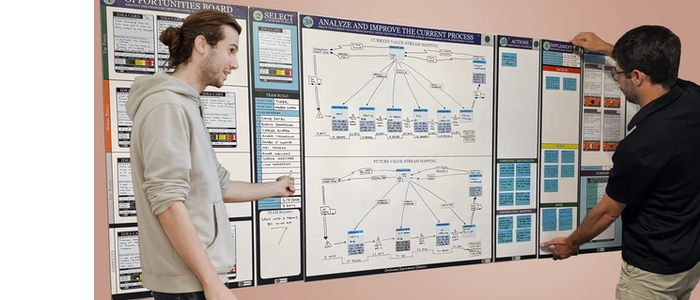
When improvement becomes a team-wide habit, a Kaizen board makes the whole flow visible, from idea to result. Start with the Kaizen Opportunities Board for idea capture, or use the Complete Kaizen Board Set to run the full continuous improvement cycle on one wall.
Example 4: Visual Workflow Board Template
Best for: project teams, creative teams, engineering teams, marketing teams
Template Layout
- Backlog
- Ready
- In Progress (with WIP limit)
- Review
- Done
Upgrades That Make It “Visual Management” (Not Just Kanban)
- Add blocker signals (red marker/magnet)
- Add aging (days-in-column count)
- Add service classes (swimlanes or color cards)
Step-by-step setup: How to Build a Kanban Board. For a ready-made wall board, see the magnetic Kanban Board Kit or the 2-in-1 Kanban Board Set (wall plus desktop). Hybrid teams that need the same board in the room and on remote screens can look at the 32-inch Digital Kanban Board.
Example 5: Leadership Tier Board Template (Escalation)
Best for: multi-team organizations that need fast escalation without chaos
Template Layout
- Tier 1 (Team): today’s issues, actions, KPI snapshot
- Tier 2 (Department): escalations + cross-team blockers
- Tier 3 (Site/Leadership): constraints, resource decisions
The key idea: problems move upward only when they can’t be resolved at the team level, and each escalation includes an owner + request (what decision/support is needed).
For leaders who also need to see every project at once, the Portfolio Management Board Set puts multiple projects, owners, and status on one magnetic wall. Related reading: Daily Management Boards: How Leaders Stay Aligned.
Which Board Fits Which Use
| If your team needs to… | Use this example | Ready-made board |
|---|---|---|
| Run a short daily huddle with visible follow-ups | Example 1: Daily Huddle | Kaizen Actions Board |
| Track output, quality, shipping, or inventory every day | Example 2: KPI Performance | KPI performance boards |
| Capture improvement ideas and drive them to results | Example 3: Quick PDCA | Kaizen board sets |
| Limit WIP and keep project work flowing | Example 4: Visual Workflow | Kanban and Agile board sets |
| See many projects, owners, and risks at once | Example 5: Leadership Tier | Portfolio Management Board Set |
Printable Visual Management Board Templates (Copy/Paste)
Template A: Daily Huddle
- Top 3 Priorities: ____ / ____ / ____
- Blockers (Owner / Next Step / Due):
- Actions:
- Notes / Decisions:
Template B: KPI Snapshot
- KPI 1: Target ___ | Actual ___ | Trend ___
- KPI 2: Target ___ | Actual ___ | Trend ___
- KPI 3: Target ___ | Actual ___ | Trend ___
- Top Issue + Countermeasure:
Template C: PDCA Mini-Board
- Plan: Problem + target condition
- Do: Countermeasure we will try
- Check: Result + evidence
- Act: Standardize or adjust
Printed templates are a good way to test a layout. Once the team uses it every day, a magnetic whiteboard version survives daily updates far better than paper and tape.
How to Make Your Board Stick (So It Doesn’t Become Decoration)
- Assign a board owner (not a “manager”—a clear caretaker)
- Schedule the review at the board (huddle, daily check, weekly review)
- Remove anything not used weekly
- Track action completion rate (nothing kills boards like stale actions)
Frequently Asked Questions
What should a visual management board include?
Keep it to four things: today’s priorities, a small set of KPIs, current blockers, and open improvement actions, each with a clear owner.
Physical or digital visual management board?
Physical boards win for co-located teams because they are always visible and fast to update during a huddle. Digital boards suit hybrid teams that need the same view in several places. Many teams use a physical board on the floor and a digital view for remote members. See Physical or Digital Board: Which One to Choose.
How many KPIs should one board show?
Two to five per team board. If a metric isn’t reviewed every week, take it off.
Final Thoughts
Visual management boards work because they reduce friction: fewer meetings, fewer misunderstandings, faster action, and better learning. Start small—pick one template, run a daily review for two weeks, and improve the board based on what the team actually uses.
Ready to put one on the wall? Browse PMXBOARD KPI performance boards, Kaizen board sets, and Kanban and Agile board sets, all shipped directly from pmxboard.com.
Related Articles
- PDCA Cycle Explained (Plan-Do-Check-Act Guide)
- Kaizen Events vs Daily Kaizen: What’s the Difference?
- How to Run a Kaizen Event (Step-by-Step Playbook)
- Kanban Whiteboards