
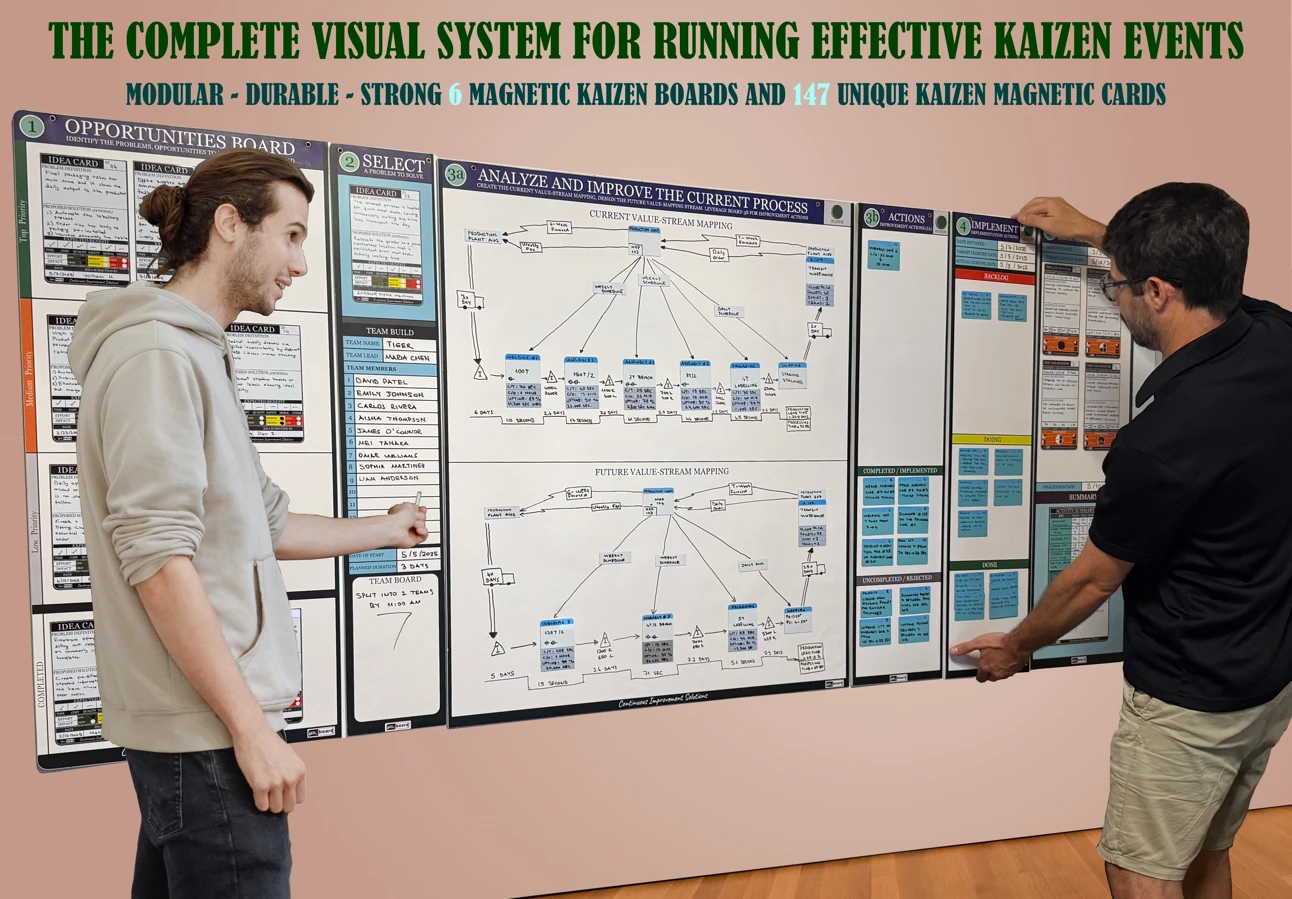
A Kaizen board is a visual management board where a team collects improvement ideas, picks the ones worth doing, works them through to action, and checks whether the change actually helped. It turns "we should fix that" into a visible queue of improvements with an owner and a result.
This guide explains what a Kaizen board is, how a physical Kaizen board is laid out, what goes on each card, and how to set one up in a single shift. If you already know you want one and need to pick a size or set, go straight to the Kaizen board selection guide.
Quick answer: what is a Kaizen board?
Kaizen means continuous improvement: many small, steady changes made by the people who do the work. A Kaizen board is the place where that improvement work becomes visible. Ideas go on cards, cards move across zones as they are selected, analyzed, acted on and measured, and the whole team can see at a glance what is being improved, who owns it, and what changed.
Most Kaizen boards follow the PDCA cycle (Plan, Do, Check, Act). The left side of the board is about finding and choosing problems (Plan), the middle is about making the change (Do), and the right side is about measuring the result and deciding whether to keep it (Check and Act).
Kaizen board vs Kanban board, in one line: a Kanban board shows the flow of everyday work, while a Kaizen board shows the flow of improvements to that work. Many teams run both. For the longer comparison, read Kanban vs Kaizen. For the philosophy behind it, start with What Is Kaizen?
The standard Kaizen board layout
There is no single official template, but a practical physical Kaizen board usually has six zones, read left to right. The PMXBOARD Kaizen system uses this same order, one board per zone:
- Opportunities. Every improvement idea lands here first, sorted into high, medium and low priority. Anyone on the team can add a card.
- Select. The few ideas the team commits to now. Each selected idea gets a team, a goal and a time box.
- Analyze & Improve. Where the team maps how the process works today and how it should work, often as a current-state and future-state value stream map, to find the waste.
- Actions. The specific changes that came out of the analysis, each with an owner and a due date.
- Implementation. Approved actions moving from planned, to in progress, to done.
- Test & Monitor. The before and after numbers that show whether the change worked, plus a short summary of the result.
Small teams that only do daily improvement often start with just the first and last zones: an ideas area and a results area. Teams that run full Kaizen events use all six, because the analysis and action zones are where most of an event's time goes. The Kaizen events vs daily Kaizen article explains when each approach fits.
What goes on a Kaizen card
The card is what makes the board work, so keep it short and consistent. A useful card answers five questions:
- What is the problem? One sentence, written so someone from another shift understands it.
- Where does it happen? The line, cell, desk or step in the process.
- Who owns it? One name, not a department.
- What is the idea or action? The change you plan to try.
- How will you know it worked? One measure, such as minutes saved, defects per shift or days to approve.
Use different card types for different zones so nobody confuses an idea with an approved action. On a magnetic board the card itself moves from zone to zone, which means the history of each improvement stays in one place instead of being rewritten on a new sticky note at every step. Red and green status magnets on a card are a quick way to flag "stuck" or "on track" without extra words.
How to set up a Kaizen board in one shift
- Pick one focus area. One line, one cell or one office process. A board that tries to cover the whole site turns into a suggestion box nobody reads.
- Put it where the work happens. Hang the board on the floor or in the team area, not in a meeting room down the hall.
- Seed the Opportunities zone. Ask the team for ten real problems from the last two weeks and write each on its own card.
- Select one to three. Move only the ideas the team can actually work on now into Select, and give each an owner and a date.
- Set the review rhythm. A short stand-up at the board, about ten minutes a day or a few times a week, is enough. Move cards during the meeting, not after it.
- Record the result. When an action is done, write the before and after number on a results card in Test & Monitor. If it did not help, say so and move the idea back.
Running a full multi-day event instead? The How to Run a Kaizen Event playbook covers the agenda and roles, and the free Kaizen Event Starter Kit gives you free PDF templates for capturing problems, mapping the process, planning actions and tracking results.
Two Kaizen board examples
These are illustrative examples of common uses, not customer case studies.
Manufacturing cell, changeover time. Operators add cards for every delay they see during changeovers: missing tools, waiting for a first-piece check, hunting for the right fixture. The team selects the two biggest, maps the changeover steps in the Analyze & Improve zone, and creates action cards such as a shadow board for tools and a pre-staged fixture cart. Test & Monitor tracks changeover minutes per shift for the next few weeks.
Office process, invoice approvals. A finance team adds cards for invoices that stall: missing purchase order numbers, unclear approvers, approvals stuck in email. The team selects the approver problem, maps who touches an invoice today, and moves actions such as a single approver list and a weekly exception review to Implementation. Test & Monitor tracks days from invoice received to approved.
Physical board or printable template?
If you want to try the idea first, a plain whiteboard with taped columns and sticky notes is a fine start for a week or two. The common problems show up quickly: notes fall off, columns get redrawn, and nobody can tell an idea from an approved action. That is usually the point where teams move to a pre-printed magnetic board with dedicated card types for each zone.
A physical board is the better fit when the team works in one place, meets at the board, and needs the improvement work to stay visible to everyone walking past. If your team is fully remote, a physical Kaizen board is the wrong tool, and the selection guide says the same.
Common mistakes that make a Kaizen board go stale
- Too many selected ideas. If Select holds ten cards, nothing finishes. Limit it to what the team can work this week.
- No owner on the card. "Maintenance" or "IT" is not an owner. One name per card.
- No result recorded. If Test & Monitor is empty, the team cannot see that improvement pays off, and ideas stop coming.
- Skipping the review. The board only works if the team stands at it on a regular rhythm.
- Treating it as a complaint wall. Every card in Opportunities should be a problem the team can influence.
Kaizen board FAQ
What is a Kaizen board used for?
To capture improvement ideas, decide which ones to work on, track the actions, and show the results, so continuous improvement is visible and owned by the team instead of living in a spreadsheet.
What columns should a Kaizen board have?
A full board follows the PDCA cycle: Opportunities, Select, Analyze & Improve, Actions, Implementation, and Test & Monitor. A simple daily board can start with ideas, in progress, and results.
What is the difference between a Kaizen board and a Kanban board?
A Kanban board manages the flow of daily work. A Kaizen board manages the flow of improvements to that work, from idea to measured result.
How often should a team review its Kaizen board?
Short and often works best: about ten minutes at the board daily or a few times a week, plus a longer review when an action is completed.
Can I use Kaizen cards on a whiteboard I already have?
Yes. The PMXBOARD Kaizen Magnetic Card Set (147 cards across 7 types, $189) works on any magnetic whiteboard as well as on PMXBOARD Kaizen boards.
Get a ready-made Kaizen board
If you want every zone above on one wall without drawing it yourself, the Complete Kaizen Board Set ($556) includes all six modular magnetic dry-erase boards, from Opportunities to Test & Monitor, with 135 magnetic cards and 10 red/green status magnets.
Starting with idea capture only? The Kaizen Opportunities Board Set ($129) is a 17.3 x 38 in board with high, medium and low priority zones and 10 Idea Cards. You can add the other stages later.
To compare every stage board by size, contents and price, read the Kaizen board selection guide or browse all Kaizen boards.
Product details and prices were taken from the live PMXBOARD product pages on October 17, 2026. Confirm on the product page before you order.